IT Documentation
Implementation details for Clever setup, data sync, access levels, and AnySchool configuration. For general IT, privacy, and deployment information, refer to the main IT Leader Information page.
Clever Setup
The guide below will be helpful in setting up the 1-2-3 Wellness™ App for your school or district. Please refer to the official Clever documentationn linked in the articles below for setup and data sharing steps with applications like 1-2-3 Wellness.
Setup Guide
- 01
Request application access
In your Clever dashboard, request access to our application: https://schools.clever.com/applications/add/123-wellness
For detailed instructions, see Clever's guide: Requesting apps in Clever.
- 02
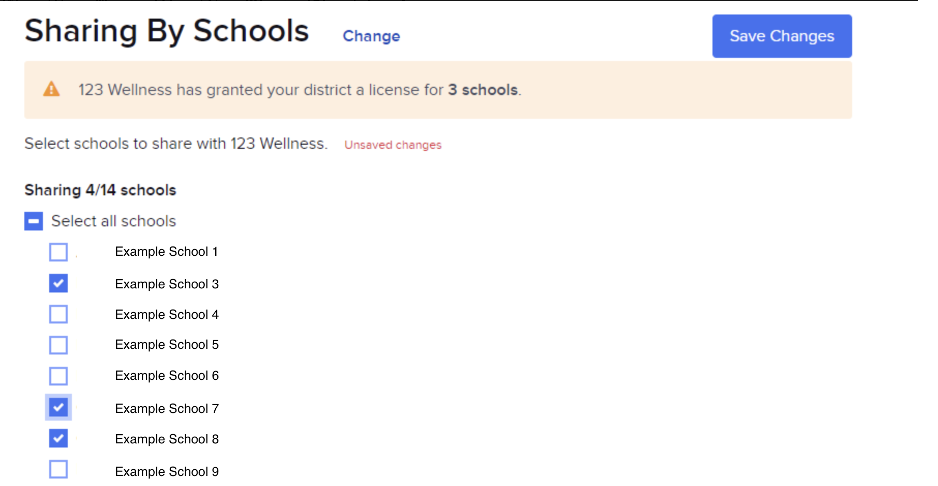
Set sharing permissions
After your request is approved, set your sharing permissions. We will request this from you directly, but you must confirm it on Clever.
For detailed instructions, see Clever's guide: Set sharing permissions in Clever.
- 03
Configure staff roles
Staff titles may require custom configuration to grant school-wide data access. If you want a leader to have access to data for all students in ONE school, please make sure that they are listed as “staff” in Clever and have the correct school(s) that you’d like them to have access to. Set their title field in Clever's Custom Data to one of the following values: principal, counselor or admin (see table below).
Clever Title1-2-3 Wellness RoleData AccessPrincipalAdminSchool-wide dataCounselorAdminSchool-wide dataAdminAdminSchool-wide dataIf you want a leader to have access to data for all students in the WHOLE district, please make sure that they are listed as “district admin” in Clever. Anyone listed as “district admin” will automatically get district-wide access.
- 04
Allowlist the web app URL
Green list our web app URL (
app.123wellness.org) on your security software. - 05
Launch from Clever
Once configured, open the app directly from your Clever dashboard.
- 06
Allow wellness emails
Ensure that district members can receive emails from 1-2-3 Wellness from the 123wellness.org domain. For example, messages from
alerts@app.123wellness.org,reports@123wellness.organd others may be sent with important wellness information for staff and students. - 07
OptionalSet as browser homepage
Configure computers to open the app automatically when Google Chrome loads. Some schools set the homepage to the 1-2-3 Wellness app so students have immediate access upon login and can take a mindful minute before other work.
Who can access what
1-2-3 Wellness uses a role-based access control system that determines what data users can view and manage. The system integrates with Clever to automatically assign roles based on user information from your school district's Clever setup.
Role
Superadmin
Data Access
District-wide data access
Description
Access to all data and students in the district
Role
Admin
Data Access
School-wide data access
Description
Access to all data within their assigned schools
Role
Teacher
Data Access
Access to class-specific data
Description
Access to student data within their assigned classrooms or rosters
Role
Student
Data Access
No access to other user data
Description
Can only view their own wellness data
For schools not on Clever
If your school is not already connected through a district Clever setup, you can use Clever's AnySchool to share roster data with 1-2-3 Wellness — no Clever district account required.
Setup Guide
- 01
Contact our tech team
Email us with the name and email of the person who will be conducting the AnySchool integration and we will send you with a setup link for your school.
The link expires in 48 hours, is unique to the email address and can't be shared with other admins. It is also a one-time use link. We can generate a new one for you if it expires.
Contact us - 02
Complete AnySchool rostering
Use the link we send to finish setup on your end. For more information and step-by-step instructions on sharing data via AnySchool, please check Clever's official documentation:
Rostering applications with AnySchool
Contact our tech team
For implementation support or questions, contact the 1-2-3 Wellness team.